3.6.6. Configuration files

The configuration files were in Python for many years, but we have gradually made the transition to the TOML format (https://toml.io/en/). This avoids running into prohibitions against archiving source code along with data.

  • proc_cfg.toml

    • contains info for processing: serial feeds used, transducer alignment

    • DO NOT adjust anything in this file.

  • uhdas_cfg.toml

    • contains info for email, web plots, bridge plots

    • DO NOT adjust anything in this file.

  • sensor_cfg.toml:

    • data logging: (baud rates, ports, transmission methods, messages to be logged)

      • Primarily a dictionary of devices transmitting data to be recorded, with information about data types and transport methods.

      • Includes a dictionary for configuring the speedlog functionality.

3.6.6.1. sensor_cfg.toml notes and annotated example

# The /home/adcp/config directory includes the sensor_cfg.toml file that UHDAS
# uses to configure its basic data acquisition functions--which serial ports and
# network interfaces to read from and write to, what messages to record, what
# format to use for file naming, etc.  The following is an example file with
# comments added.  It is not intended as a complete description of how to write
# such a file from scratch or of all the ways it might be customized.  The
# example is taken from a recent (late 2025) installation on the Thomas G.
# Thompson, but with some of the instruments ("sensors") removed for the sake
# of brevity, and with other small edits.

# The underlying file format ("TOML") is described in https://toml.io/en/. As
# used here, the file describes a top-level dictionary with key-value pairs for a
# few parameters (scalars and lists) followed by two dictionaries: "sensor_d",
# with an entry for each device from which UHDAS records data, and "speedlog_d",
# which currently supports only a single device that must also appear in
# "sensor_d".

#------------------------ example sensor_cfg.toml -------------------------

# Start with some overall parameters:

ignore_sensors = []  # If a sensor is temporarily unavailable, its name can be
                     # inserted in this list.
use_publishers = false  # Usually 'false'; if 'true', devices listed in
                        # 'publisher_keys' below would re-broadcast their
                        # inputs as zmq messages.
shipkey = "tt"  # Abbreviated ship ID, from the 'onship' package.
common_opts = "-F -m 1 -H 2 "  # File naming options; we never change these.
adcp_keys = [ "wh300", "os75",]  # List sensors that are ADCPs.
# And list all sensors.
sensor_keys = [ "wh300", "os75", "gps_cnav", "seapath", "gyro1",]
publisher_keys = [ "gps_cnav",]

# Sensor dictionary with a sub-dictionary with parameters for each sensor:

# First sensor: a Workhorse 300 ADCP:

[sensor_d.wh300]
instrument = "wh300"
device = "ttyUSB0"       # Serial port will be /dev/ttyUSB0
baud = 19200             # Baud rate for data recording
format = "binary"        # It will receive RDI PD0 datagrams, one per ping
subdir = "wh300"         # Subdirectory for writing the recorded data
ext = "raw"              # File name extension
opt = "-lE -c -O -I"     # Options for the ser_bin process
setup = "rdi_setup"      # It will use RDI commands
terminal = "oswh_term"   # It's in the Workhorse or Ocean Surveyor family
defaultcmd = "wh300_default.cmd"  # Default command file
commands = []            # No additional RDI commands are needed
datatypes = [ "wh300",]  # This is the only one for a Workhorse
wakeup_baud = 9600       # Wakeup baud rate set in the instrument; usually 9600

# Second Sensor: an Ocean Surveyor 75 kHz ADCP:

[sensor_d.os75]
instrument = "os75"
device = "ttyUSB7"
baud = 38400
format = "binary"
subdir = "os75"
ext = "raw"
opt = "-lE -c -O -I"
setup = "rdi_setup"
terminal = "oswh_term"
defaultcmd = "os75_default.cmd"
commands = [ "EA04500",]           # Ocean Surveyor needs the EA command, which
                                   # is based on the orientation of the
                                   # transducer relative to the keel.
datatypes = [ "os75bb", "os75nb",] # Broadband and Narrowband pings are available
wakeup_baud = 9600

# The remaining sensors are for position and heading.

# A GPS receiver:

[sensor_d.gps_cnav]
instrument = "C-NavX3"
device = "ttyUSB6"
baud = 4800
format = "ascii"         # NMEA messages coming via serial port
subdir = "gps_cnav"
ext = "gps"
strings = [ "$GNGGA",]   # Messages to record
messages = [ "gps",]
opt = "-c -Y2"
# The last 2 entries are active only if 'use_publishers' is 'true':
pub_addr = "tcp://127.0.0.1:38000"  # PUB address for zmq
sample_opts = "-c -Y2 -s60"  # Extra options governing the zmq re-broadcast.

# More GPS plus accurate heading:

[sensor_d.seapath]
instrument = "Seapath 380"
device = ":13551"         # Port to which the Seapath is broadcasting UDP datagrams
format = "udp_ascii"      # Receive NMEA messages as UDP datagrams
subdir = "seapath"
ext = "sea"
strings = [ "$INGGA", "$PSXN,20", "$PSXN,23", "$INHDT",]
messages = [ "gps", "sea", "hdg",]
opt = "-Y2"

# Good old-fashioned reliable compass:

[sensor_d.gyro1]
instrument = "Gyro1"
device = "ttyUSB1"
baud = 4800
format = "ascii"
subdir = "gyro1"
ext = "hdg"
strings = [ "$HEHDT",]
messages = [ "hdg",]     # This would be "hnc" if the particular compass does
                         # not use checksums for its NMEA messages.
opt = "-c -Y2 -s5"       # And with "hnc" (no checksums), delete the "-c".

# End of the sensor dictionary.

# Speedlog dictionary, with its one entry:

[speedlog_d.wh300]
instrument = "wh300"
serial_device = ""
baud = 9600
zmq_from_bin = "tcp://127.0.0.1:38010"
pub_addr = "tcp://127.0.0.1:38020"
eth_port = "eno1"
scale = 1.0
bins = [ 1, 3,]
navg = 5
subdir = "wh300"

#==============================================================================

3.6.6.2. Documentation of the low-level data recording executables and options


----------
see README.txt
updated: 2024-10-05
All code here was written by Eric Firing, Univ. Hawaii
Additional docs by Julia Hummon, University of Hawaii
----------

Installation:

The ser* executables should be owned by root and the suid
bit should be set; this allows them to lock memory and use
realtime scheduling.  They will use their suid root privilege
only for this purpose, and then drop it.

chmod u+s ser_asc ser_bin ser_asc_zmq

They will write lock files in /var/lock, and they will not
take advantage of their suid privilege to do so.  Therefore,
/var/lock needs to be world-writable (or writable by whoever
is running ser_*), and the serial port also needs to be readable
and writable by the user.

Naming scheme:
The first part, "ser", "udp", "zmq", indicates the source of
messages or of 2-way communication: serial port, udp broadcast or
multicast, or a zmq publisher.
The second part, "asc" or "bin", specifies ASCII input or communication
with an ADCP.
The third part, "zmq", if present, means that there is an option to
publish messages via zmq.

Note: ser_bin includes the zmq publishing option; the original ser_bin.c
has been removed, and ser_bin_zmq is compiled to ser_bin.


Usage:

ser_asc [options] [string1] [string2] ...
ser_asc_zmq [options] [string1] [string2] ...
udp_asc [options] [string1] [string2] ...
udp_asc_zmq [options] [string1] [string2] ...
zmq_asc [options] [string1] [string2] ...

   string1 and string2 are the initial parts
   of each of up to 10 desired messages.  These initial
   string segments to be matched can be any length, but will
   typically be something like "$GPGGA".  The match always
   starts at the beginning of the string. If no messages are
   specified, use the "-a" switch to indicate all strings should
   be logged.  There is very limited wildcard support: a "?"
   matches anything, so "$??GGA" would match "$GPGGA" and "$INGGA".
   Specification of exact matches without the wildcard is
   preferred, however.

ser_bin [options]

zmq_bin_zmq [options] [string1] [string2] ...

    string1 etc. are message subscription strings, to be found
    in the first part of 2-part messages.

---------------------------------------------------------------

  Options specific to ser_asc and ser_bin.
  --------------------------------------
   b :  Baud rate, e.g. 9600
   P :  Port name, e.g. ttyS1.  At present, this must
        not include the full path, and the path /dev/ is
        assumed.

  Options specific to udp_asc and udp_asc_zmq
  -------------------------------------------
   U :  network address, ip:port, e.g. ":51234" or
        "224.0.36.0:51234". The blank ip field in the first
        example corresponds to the wildcard (receive from
        any address).  The second example corresponds to
        the case where the packets are multicast to the group
        given by the combination of ip address and port. The
        multicast case can also be made more explicit by adding
        the "M" prefix, e.g. "M224.0.36.0:51234".  A final
        option is to use the "H" (host) prefix, in which case
        the IP is that of the interface on which one wishes to
        listen, instead of listening to all.  For example, if
        a machine is on 2 networks and has 2 host IPs, e.g.,
        192.168.1.74 and 192.168.2.74, and one wants to receive
        UDP only from the first, the U argument would be
        "H192.168.1.74:51234".

  Options specific to ser_asc_zmq, ser_bin, udp_asc_zmq, zmq_asc
  --------------------------------------------------------------
   Z :  The zmq url, e.g., "tcp://*:5556"

  Options specific to zmq_bin_zmq
  -------------------------------
  z :   The zmq incoming (subscription) url, e.g.,
        "tcp://172.16.2.211:5678", pointing to the bin publisher,
        e.g. the process replaying a cruise.

  Options common to all
  ---------------------
   d :  Directory in which data will be logged.
   f :  Prefix of filename for data. (E.g., "km" for the
        Kilo Moana)
   e :  Extension of data file. (E.g., ".raw" for binary,
        ".gps" for nmea messages from a gps receiver.)
   y :  yearbase for file naming

   m :  /* 0: decimal day; 1: seconds; 2: hhmmss; 3: .jyd */
        File naming method.  UHDAS standard is 1.
   M :  Start a new file at integral multiple of this number
        of minutes.
   H :  Same, but hours. Include M or H, but not both.
        UHDAS standard is "-H 2".

   c :  Require valid checksum for RDI raw (NB, BB, or OS)
        or for NMEA, if ascii

   F :  Flush each block to disk immediately instead of buffering.
        This is essential in UHDAS because we are processing
        the data as it lands in files.
   T :  long integer argument, unix time: use this time for
        naming the first file. This is used to synchronize the
        filenames from the different data streams when starting
        UHDAS. It is automatically supplied by UHDAS.

   o :  Output pipe name to optionally replace stdout.

   i :  Input pipe name to optionally replace stdin. A single 'X'
        received via stdin, or this pipe if it is present, stops
        the process.

    Note: The functions ending in "zmq" (ser_asc_zmq, udp_asc_zmq,
    ser_bin_zmq, zmq_bin_zmq) use SIGINT, or equivalently SIGTERM,
    to signal a halt. All except for ser_asc_zmq remain capable of
    using the 'X' via stdin mechanism to stop.  In ser_asc_zmq this
    capability can be re-enabled by defining a variable when compiling.
    All functions not ending in "zmq" leave SIGTERM with its default
    handler.  All this is a bit confusing, and probably subject to
    change.  For a summary, use "grep signal\( *.c".

  Options specific to ascii input.
  ---------------------------------
   s :  skip;  -s 5  means keep every 5th line of each specified
        message.
   a :  Log all lines.  Overrides specific message list;
        required if no messages are specified.
   Y0 : (or no Y option at all): no time tag
   Y1 : $UNIXD time tag precedes each line; this is obsolete.
   Y2 : $PYRTM time tag precedes each line.

    Note: in ser_asc_zmq, the skip value applies only to the
    lines written to disk, not to the zmq messages.  A value
    less than or equal to zero will suppress file writing.


  Options specific to binary files.
  ---------------------------------
   O :  Include this if and only if logging OS, WH, BB,
        or PN raw data.
   I :  Initiate pinging.  This gives the command
        to start pinging; the type of command depends
        on the instrument, which is OS, WH, BB, or PN if the
        O option is given, otherwise NB.
   p :  Use with I for PN data. It is needed to recognize
        the Pinnacle's different response to the CS command.
   l :  Write a log file with each data file.
   E :  Log errors to a "*.err" file.

   It is unlikely you will need to change the following:
   v :  cc_vmin  (integer) min number of characters
        default is 0
   V :  cc_vtime (integer, 1/10ths of second)
        inter-character timer (if vmin > 0) or
        timeout (if vmin = 0)
        default is 1

Note: you should use one and only one of the -M and -H
options.  If you use either, the default is equivalent to
-H2, but it is better to be explicit.

3.6.6.3. Original documentation for sensor_cfg.py

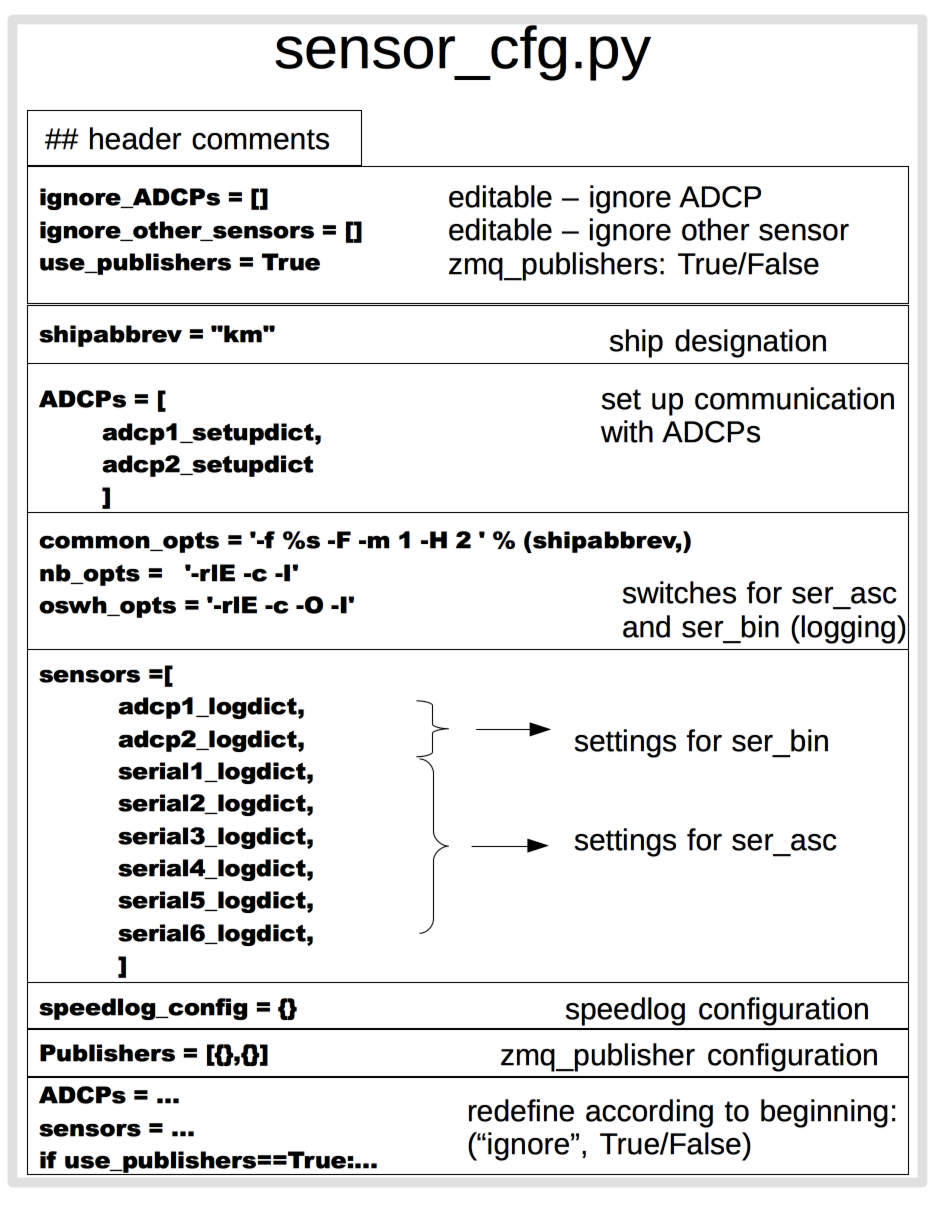
The toml and py versions are similar enough that the older documentation can still be used, until we are able to fully update it.

Sections exist to
  • turn off sensors

  • set up 2-way communication with ADCPs

  • set up to collect data

sensor_cfg.py file layout

3.6.6.3.1. ADCP dialog setup

Important considerations:
  • EA command for Ocean Surveyor can be within 10deg

  • NOTE that UHDAS does not use this field to calculate earth coordinates

sensor_cfg.py (ADCP setup)

3.6.6.3.2. Serial logging setup

Important considerations:
  • ADCP code blocks must come first, in the same order as above

  • fields subdir, ext, strings, messages, opt are documented in the code.

sensor_cfg.py (serial logging setup)